Tools for Twitterers

The popularity of Twitter has led to the creation of some great services that work with the “social networking” website. Because Twitter has a public API and makes the “tweets” (Twitter-speak for a message posted on Twitter) available to anyone, it’s easy for web developers to tap into this resource. Here are a few that I’ve found useful:

  • Twitterholic ranks twitter users according to the number of followers each user has. I follow several people on that list include Barack Obama, John Gruber, Wil Wheaton and Warren Ellis. You can also use Twitterholic to view your own history of people following you. Here’s mine.
  • TwitterLocal lets you find Twitter users in your geographical area. You can view the list of local users on the Twitterlocal website or you can subscribe to an RSS feed. They also track the top 30 locations for Twitter users in the world. Portland is currently ranked 15th only 6 spots below “Right here.”
  • TweetClouds processes all the tweets for a given user and then creates a tag cloud for that user. If you’ve tweeted for as long as I have, it takes awhile for TweetClouds to process all your tweets, but they provide you with a static link that you can pass around to people afterwards that allows for delay-free viewing of your tweeting psyche. Here’s one I generated as I wrote this. I am evidently obsessed with “time” and “watching”.
  • Quotably provides context for Twitter conversations by showing them as threaded discussions. If you glance at the Quotably page for my tweets, you’ll see people who reply to me as well as anybody to whom I might have replied. I use this when I see people I follow replying to people whom I don’t follow.
  • Twitter itself provides a range of “badges” that let you display your tweets on your web page, Facebook account, Myspace account and others. If you look on the left of this page, you’ll see that mine displays my three most recent tweets.
That’s just a few of the tools that are available. Googling “twitter tools” reveals that there are many, many more out there. This article has a pretty good list.
Beating GrowCube

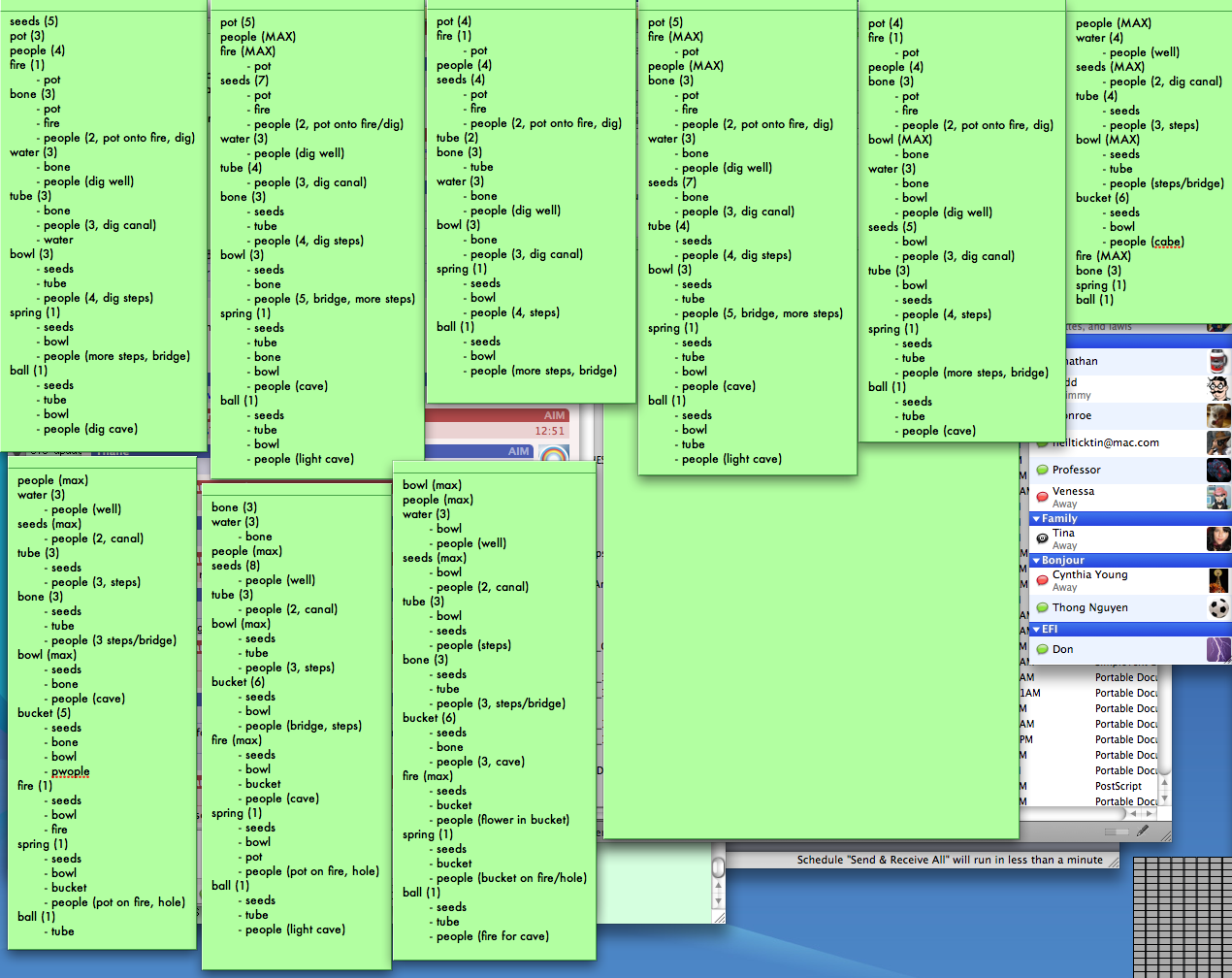
A couple of weeks ago, Graham recommended a few game sites to me. It didn’t take long to get tired of Beeboxing, but solving GrowCube, the first game on EyesMaze, took much longer than I would have thought. After a few minutes of clicking the pieces in various orders, it became clear that there was a specific set of rules involved with each piece and one only had to had to figure out the rules. Since there were a finite (although large) number of playing combinations, I set about recording the results for several games:

Obsessive notes
Click to enlarge

As you can tell from my copious notes, I designated the pieces on left (top to bottom) as “bone”, “water”, “ball”, “bowl” and “seeds”. The pieces on the right I called “pot” (and sometimes “bucket”), “tube”, “spring”, “people” and “fire”. I tried the pieces in different orders and recorded the actions that occurred after each play. With these results, I was able to generate a set of rules that I could test. These were the initial rules that I noted:

  • People have 6 tasks
  • People cannot do more than 1 task per turn
  • Canal must follow well
  • Steps must follow canal
  • Steps/bridge must follow steps
  • Cave must follow steps/bridge
  • Lighting cave must follow cave
  • Seeds will not grow without water
  • Tube must be placed after seeds
  • Fire will level up 4 turns after placement
  • Fire cannot level up before pot is moved

At this point it became obvious that a long set of rules would not provide all of the information about relationships and dependencies that I needed, especially when it came to describing the changes that each object went through with each turn. So I decided to document these changes for some of the objects and try to establish rules based on those changes. I started with the most complicated objects (those requiring the most changes to reach “MAX”):

Pot life-cycle:                   

  1. Place
  2. Embiggen
  3. Embiggen (next turn)
  4. Moved (after fire played, 2 people)
  5. Plant added
  6. Fruit added
  7. ??
Seeds life-cycle:                   

  1. Place
  2. Grow (one turn after canal is dug)
  3. Grow (next turn)
  4. Grow (next turn)
  5. Grow (next turn)
  6. Grow (next turn)
  7. Seeds (next turn)
  8. Fruit (next turn) MAX
Tube life-cycle:                 

  1. Place on seeds
  2. 180 turn (next turn)
  3. Extend to back (next turn)
    • pot hole must be available
    • seeds must be level 6
  4. Around corner (next turn)
  5. Through and up
  6. ??
Bowl life-cycle:                  

  1. Place
  2. Tower (next turn)
  3. Plants (next turn)
  4. Bubbles (next turn) MAX

Bone life-cycle:

  1. Place
  2. Skull
  3. Horns
  4. ??
Water life-cycle:                   

  1. Place
  2. Lake (dug by people)
  3. Canal (dug by people)
  4. Down steps (dug by people)
  5. ??
People life-cycle:

In addition, I also observed that the pieces activated during each turn in this order:

  1. seeds
  2. tube
  3. bone
  4. bowl
  5. pot
  6. people (activate water, fire, spring, ball)

Given all that, I established the following as my base play order:

  1. people
  2. water
  3. seeds
  4. tube
  5. pot
  6. fire
  7. bone
  8. bowl
  9. spring
  10. ball

After a little experimentation, I finally figured it out today (spoiler follows):
Continue reading “Beating GrowCube”

Remember mix tapes?

Before CD burners became inexpensive and ubiquitous, sharing music with friends and family meant making a mixed tape. Now you can share music with friends online with muxtape.com. The interface for adding songs is dead simple and it’s easy to check out the different mixes people have put up. My first mix features all live acoustic tracks. Just click on the song you want to hear and enjoy! If you make your own muxtape, be sure to email me the address.